
We may earn money or products from the companies mentioned in this post. As an Amazon Associate I earn from qualifying purchases. Disclosure of Material Connection: Some of the links in this post may be "affiliate links." This means if you click on the link and purchase an item, I will receive an affiliate commission.
How to Make a Funeral Program: Step-by-Step Guide + Free Template (2026)
Creating a funeral program (also called a memorial program or celebration of life program) is one of the most meaningful tasks you can do after losing someone you love. It becomes both a practical guide for guests and a keepsake they can take home.
The good news? You do not need graphic design experience. With the right process and a good template, you can create a beautiful, professional-looking funeral program in a few hours.
In this complete guide you’ll learn exactly how to make a funeral program from start to finish, what to include, design tips that look polished, printing options, and where to get free and paid templates.
Why a Funeral Program Matters
A well-made funeral program does three important things:
- It guides guests through the order of service so they know what is happening.
- It tells the story of the person who died in a personal way.
- It becomes a tangible keepsake that family and friends will keep for years.
Whether you are planning a traditional funeral, a memorial service, or a celebration of life, the process is very similar.
What You’ll Need Before You Start
Gather these items first so the design process stays smooth:
- Full legal name of the deceased (plus any nickname they preferred)
- Dates of birth and passing
- High-resolution photos (at least 300 DPI for printing)
- Order of service details (speakers, music, readings, times if known)
- A short obituary or life summary
- Favorite poems, scriptures, song lyrics, or quotes
- Names of surviving family members (optional)
- Any special acknowledgments or donation information
Having everything ready before you open a design tool saves a lot of frustration.
Step-by-Step: How to Make a Funeral Program
Step 1: Choose Your Format
The most common formats in 2026 are:
- Bi-fold (half-fold) – One sheet of 8.5″ × 11″ paper folded in half. Creates four panels. This is the most popular and easiest to print at home or a local shop.
- 8-page booklet – Two sheets folded and nested (or professionally saddle-stitched). Gives more room for photos and longer text.
- Tri-fold – One sheet folded into three panels. Good for simpler services.
- Single-page – Front and back only. Best for very short services or when budget is tight.
For most families, the classic bi-fold is the sweet spot between space and simplicity.
Step 2: Choose or Download a Template
You have three main options:
- Free template – Perfect if you want something quick and clean.
- Editable Canva or Word template – Easy to customize with your own photos and text.
- Premium or custom design – Best when you want something truly unique.
Grab your free starting point here:
Download my free Farewell Files / Funeral Essentials Kit. It includes ready-to-use funeral program templates, an obituary template, and a fill-in-the-blank eulogy template. It’s designed specifically for people who need something beautiful without the overwhelm.
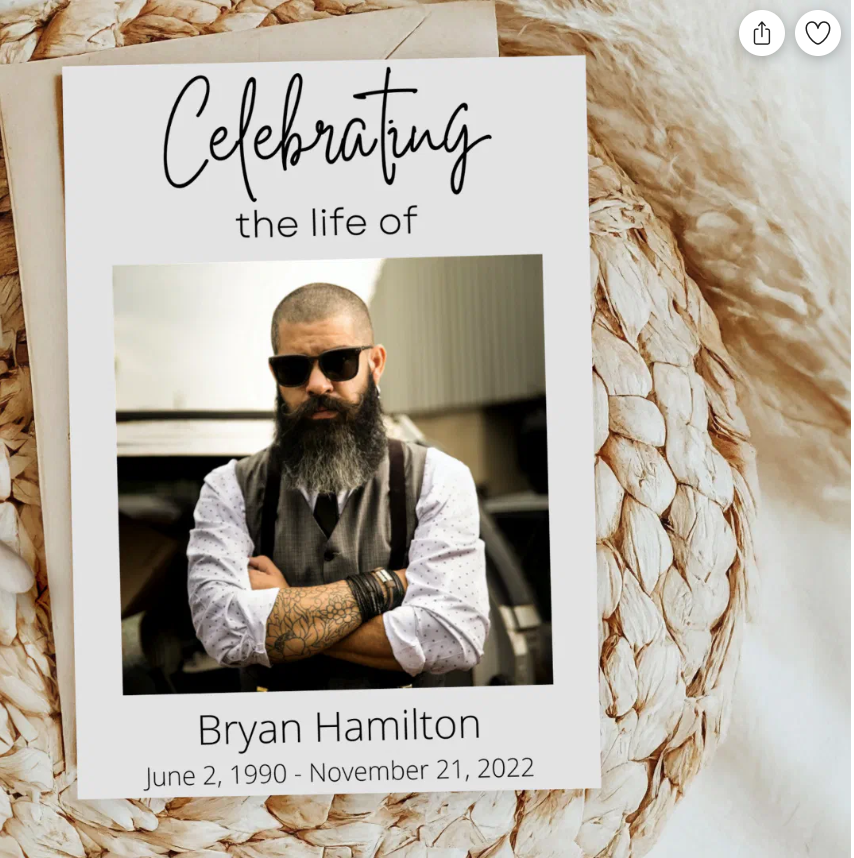
If you prefer to customize further or order printed versions, browse my Zazzle Texas2Step funeral program collections. You can upload your own photos, change colors and text, and have professionally printed programs shipped to your door.
Step 3: Design the Cover
The cover is the first thing guests see. Keep it clean and meaningful.
Typical elements:
- A favorite photo of your loved one
- Full name
- Birth and death dates
- A short phrase such as “In Loving Memory,” “Celebrating the Life of,” or “A Life Well Lived”
Design tip: Use soft, respectful colors (ivory, soft gray, sage, dusty blue, or gentle florals). Avoid anything too busy or brightly colored unless it truly reflects the person’s personality.
Step 4: Create the Order of Service
This is the heart of the program. A clear order of service helps everyone follow along.
Common structure:
- Prelude / Gathering Music
- Welcome or Opening Remarks
- Opening Prayer or Reading
- Musical Selection
- Eulogy or Personal Reflections
- Scripture or Poem
- Additional Speakers or Open Sharing
- Closing Prayer or Benediction
- Recessional
- Reception or Graveside information (if applicable)
Keep the language warm and simple. You can list the names of readers, musicians, and speakers.
Step 5: Write or Add the Obituary / Life Tribute
This section tells the story. Aim for 150–300 words. Include:
- Where and when they were born
- Family background
- Education and career highlights
- Passions, hobbies, and personality
- Surviving family members
Write in a natural, loving voice rather than formal newspaper style.
Step 6: Add Photos, Poems, and Acknowledgments
Most programs include:
- One or two additional photos inside
- A favorite poem, scripture, or song lyric
- A short thank-you message from the family
- Donation or memorial fund information (optional)
Step 7: Proofread Carefully
Have at least two other people read the entire program. Check every name, date, and spelling. Errors on a funeral program are especially painful.
Step 8: Print Your Programs
Options ranked from fastest to most polished:
- Home printer (use good quality cardstock or heavy paper)
- Local print shop or office supply store (Staples, Office Depot, FedEx Office)
- Online printers
- Zazzle (convenient if you used one of my designs, they handle printing and shipping)
Recommended paper: 80–100 lb cardstock or a nice uncoated text weight for a soft, elegant feel.
Design Tips That Make Your Program Look Professional
- Stick to two fonts maximum (one for headings, one for body text)
- Leave enough white space — crowded programs look stressful
- Make sure photos are high resolution
- Keep margins at least 0.5 inches
- Use consistent alignment
- Test-print one copy before ordering a large quantity
Free vs Paid Templates: Which Should You Choose?
Free templates work well when you need something simple and fast.
Paid or customizable templates (like those on Zazzle) give you more polished designs, better photo placement, and the option to have them professionally printed and shipped.
If you feel overwhelmed or want something completely custom, you can also email me for done-for-you design support.
Recommended Amazon Supplies
A few practical items that make the process easier:
- High-quality cardstock or invitation paper
- A reliable color printer (if printing at home)
- Photo paper for any additional prints
- Simple frames if you want to display a larger version of the cover photo at the service
(Always double-check current product links and availability.)
Final Checklist Before You Print
- All names and dates are correct
- Photos are clear and high resolution
- Order of service matches the actual service
- Spelling and grammar have been checked by at least two people
- You have printed a test copy
- You ordered enough extras for family members who cannot attend
Frequently Asked Questions
How many funeral programs should I print?
Most families print 100–250, depending on expected attendance. It’s better to have a few extras than to run out.
Can I make a digital funeral program instead?
Yes. Many families now create a PDF version to email or display on a screen, especially for hybrid or virtual services.
How long does it take to make a funeral program?
With a good template, most people finish the design in 2–4 hours. Allow extra time for gathering photos and writing the obituary.
What is the difference between a funeral program and a celebration of life program?
The structure is almost the same. Celebration of life programs often feel a bit lighter in tone and may use brighter colors or more personal stories, but the core elements remain identical.
Where can I get a free funeral program template?
You can download free templates as part of my Farewell Files / Funeral Essentials Kit. It also includes an obituary template and eulogy helper.
Ready to Get Started?
Creating a funeral program is an act of love. It does not have to be perfect – it just needs to feel true to the person you are honoring.
Start here:
Download the free Farewell Files kit and choose a template that feels right.
Prefer something already designed and ready to customize?
Browse the funeral program collections in my Zazzle store.
Need more personal support during this time?
You can also reach out about custom design or my Funeral Maid support service.
You are doing something meaningful. Take it one step at a time.
